


You may have noticed something familiar: your phone worked fast and smooth when you first got it—apps opened quickly, scrolling felt instant, and everything seemed snappy. But over months or years, your phone can start to feel slower, even though nothing appears broken or “wrong.” In this article, we’ll explore why your phone feels slower over time and explain what actually happens behind the scenes. You’ll walk away understanding your device better and knowing simple, practical steps to help it feel faster again.
Let’s begin by explaining why phones slow down naturally and what you can do about it next.
Why Phones Slow Down Over Time
Your phone isn’t broken just because it feels slower. Several everyday reasons can make your device feel less snappy than it once did. Let’s break these down in simple terms.
1. More apps, more background activity
Every app you install can run tasks in the background—even when you’re not using them. These background tasks help apps stay updated (like checking messages or syncing photos). Over time, all these tasks add up and use processing power and memory, which can make your phone feel slower.
Example:
You install a social app. It updates your feed in the background. Later, you add a weather app that checks for new weather alerts. Add a few more, and suddenly your phone works harder even when you’re not using it.
This increased workload takes a toll slowly but noticeably over time. Next, let’s look at how storage affects speed. Understanding background app activity is just one part; storage also plays a big role.
2. Storage fills up slowly
Your phone uses storage space for pictures, videos, apps, messages, and temporary files. When storage gets crowded, your phone has less room to work, which can make tasks take longer.
Phones use storage not just for long-term files but also for temporary space that helps apps open faster or run smoothly. When your phone has less free space, it needs to work harder to manage these tasks.
Example:
Imagine a small desk covered in papers. If you keep adding more things on it without organizing, finding or working on anything takes longer. Phones are similar: tight space makes everything slower.
Beyond apps and storage, your phone’s own software also changes how it feels.
3. Software updates and growing features
Phone makers release software updates to fix bugs, improve security, and sometimes add new features. While updates are important, they can also require more power and memory than earlier versions.
Even if the update doesn’t break anything, these new features might run extra processes behind the scenes, which can make older phones feel slower.
Example:
A new photo feature that scans every image for depth or effects might run quietly in the background. That’s useful, but it can also use your phone’s resources.
There’s another hidden factor that many people overlook: app updates.
4. Apps get bigger and more complex
Developers improve apps over time, adding features you might like. However, these added features can also make apps larger and more resource-hungry, which means they may run slower on older phones.
Think of this like updating a simple notebook into a full planner with tabs, stickers, and extras—it’s helpful, but it also takes up more space.
Example:
A messaging app that only did text might later support video calls and animated stickers. These new features use more memory and processing power.
Now that we’ve covered the main reasons phones slow down, let’s talk about practical ways you can help your phone feel faster.
How to Make Your Phone Feel Faster Again
You don’t need to be a tech expert to help your phone work better. Here are clear, simple steps you can try today.
1. Remove unused apps
Go through your list of apps and uninstall ones you don’t use. Fewer apps mean fewer background tasks and more storage space.
Steps:
- Open your app list.
- Tap apps you rarely use.
- Select “Uninstall” or “Remove.”
Removing unused apps frees up space, but clearing storage history can help even more.
2. Clear temporary files and cache
Phones collect temporary files that help apps run faster, but too many can take up space and slow things down. Clearing these can help.
Example:
Browsers store history and cached images. Cleaning this up periodically gives your phone more breathing room.
With storage managed, let’s look at another simple improvement.
3. Restart your phone regularly
Restarting your phone closes all background tasks and gives your system a fresh start. It’s simple but effective.
Tip: Try restarting once a week or when your phone feels sluggish.
Next, let’s talk about controlling background activity for apps.
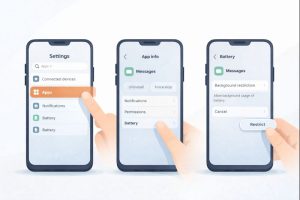
4. Limit background activity for apps
You can control which apps run tasks in the background. Limiting this can lighten the workload on your phone.
Steps for Android (example):
- Go to Settings > Apps.
- Tap on an app.
- Choose “Battery” or “Background activity.”
- Select “Restrict.”
(Note: steps may vary slightly by phone model.)
Aside from internal settings, how you use your phone also matters.
5. Update apps and system carefully
Updates can help performance, but only install updates when you have enough storage and battery. Check update notes to see if they improve performance or add heavy features.
Before we wrap up, let’s answer common questions readers often ask.
Why Your Feed Looks the Way It Does — and How Your Behavior Shapes It
Frequently Asked Questions (FAQ)
1. Does getting a new phone solve slow performance?
Not always. A newer phone will generally be faster, but good storage and app management help any phone feel smoother.
2. Can antivirus apps make my phone slower?
Some can. Choose lightweight security apps and avoid ones that constantly scan in the background.
3. Does clearing cache delete my photos?
No. Clearing cache removes temporary files, not your personal pictures or data.
4. Do widgets on my home screen slow my phone?
Yes. Widgets update frequently and use background resources. Removing unused widgets can help.
5. Should I reset my phone to factory settings?
Only if other tips don’t help. A factory reset clears everything and can make your phone feel like new, but back up your files first.
These steps and answers should make everyday use feel smoother, but now let’s pull everything together.
Conclusion
It’s normal for your phone to feel slower over time. The feeling doesn’t mean something is broken—just that your device is handling more tasks, more storage, and more features than it did when it was new. By understanding what causes this and applying simple tips like removing unused apps, clearing storage, restarting regularly, and limiting background activity, you can help your phone feel much smoother.
Your device works hard for you every day, and with a little care, it can continue to work well for a long time.

Leave feedback about this