

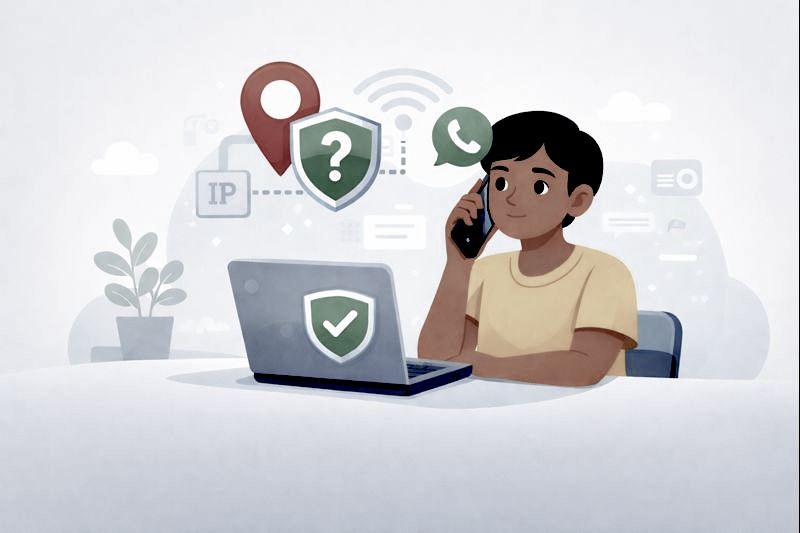
Why This Topic Matters to Everyday Users
If you use WhatsApp to make voice or video calls, you might have seen posts online warning that “your IP address can be traced.” For many beginners, this sounds scary—especially if you’re not sure what an IP address even is.
Let’s make this simple. An IP address is a basic internet identifier that helps devices communicate online. It does not reveal your home address or personal identity on its own, but some people prefer to limit how much information is shared during online calls.
For example, imagine getting a WhatsApp call from someone you don’t really know, then later wondering, “Did that call expose any of my internet details?” This article is written to calmly explain what’s true, what’s not, and what simple, legitimate steps you can take to improve your privacy—without technical knowledge or fear.
What an IP Address Is
An IP address is like a temporary internet label assigned to your device when you go online. It helps apps know where to send data, such as messages or call audio.
Important things to understand:
- An IP address does not show your exact location
- It changes over time for most users
- It is used by almost every internet app
Sharing an IP address is not the same as sharing your phone number, home address, or identity.
How WhatsApp Calls Work at a High Level
When you make a WhatsApp call, your phone needs a way to send your voice or video to the other person. There are two general methods apps use:
- Direct connection (faster, but may expose IPs)
- Relayed connection (more private, but slightly slower)
WhatsApp now gives users more control over this process by offering a privacy setting that helps protect IP addresses during calls.
Can Your IP Be Traced Through WhatsApp Calls?
In some cases, a direct call connection may allow the other party to see the IP address used during the call. This does not mean they can track you precisely or access your device. For beginners, the key takeaway is this:
IP exposure is about technical routing, not personal tracking.
WhatsApp has introduced features to reduce this exposure, and most users never experience problems from normal calls.
Step 1: Turn On WhatsApp’s Call Privacy Feature
Why this matters
WhatsApp offers a setting that routes calls through its servers instead of directly between users. This helps prevent IP addresses from being shared during calls.
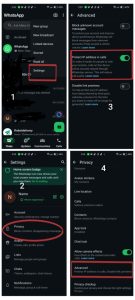
How to enable it (step-by-step)
- Open WhatsApp
- Go to Settings
- Tap Privacy
- Select Advanced
- Turn on Protect IP address in calls
Once enabled, WhatsApp will prioritize privacy over speed for calls.
Beginner example
If you often receive calls from people you don’t know well such as online contacts, this setting adds an extra layer of comfort.
Step 2: Be Careful With Unknown Callers
Why this is important
Most privacy concerns happen when calls involve strangers. If you don’t recognize a number or contact, you don’t have to answer.
Simple habits that help
- Ignore calls from unknown contacts
- Block suspicious numbers
- Avoid returning missed calls from strangers
Example
If someone messages you first and then calls unexpectedly, it’s okay to ask who they are before answering—or not answer at all.
Step 3: Use Trusted Internet Connections
Public Wi-Fi vs home networks
Public Wi-Fi networks (like cafés or airports) are shared by many people and may offer less privacy than home or mobile data connections.
Safer choices
- Use mobile data for WhatsApp calls when possible
- Avoid sensitive calls on public Wi-Fi
- Use familiar, trusted networks
Example
If you’re in a café and need to make a call, waiting until you’re back on mobile data can reduce unnecessary exposure.
Step 4: Keep WhatsApp Updated
Why updates matter
App updates often include privacy improvements and security fixes. Using an outdated version may mean missing important protections.
What to do
- Enable automatic updates
- Check app store updates regularly
This is one of the easiest ways to improve privacy without changing how you use the app.
Common Myths Beginners Should Ignore
“Someone can find my house from my IP”
This is a common misunderstanding. An IP address may show a general region, not a precise address.
“Every WhatsApp call exposes full details”
Not true. Privacy settings and call routing reduce exposure.
“Only experts can stay safe”
False. Simple settings and awareness are usually enough.
Simple Privacy Habits for Everyday WhatsApp Use
- Enable call privacy settings
- Avoid unknown callers
- Use trusted internet connections
- Keep apps updated
- Don’t panic over online claims
Privacy is about consistency, not perfection.
Conclusion
You don’t need to stop using WhatsApp or become technical to protect your privacy. WhatsApp already provides tools that help limit IP exposure during calls, and enabling them takes only a few steps.
Key takeaways:
- Turn on WhatsApp’s IP protection setting
- Be cautious with unknown callers
- Prefer trusted networks
- Keep your app updated
- Don’t believe exaggerated online claims
With simple habits and calm awareness, you can use WhatsApp calls confidently and safely.
How to secure your online accounts: A Beginner’s Guide
Common Online Scams Beginners Should Know
FAQ Section
1. Can WhatsApp calls expose my IP address?
In some cases, yes, but WhatsApp offers a setting to help protect your IP during calls.
2. Does an IP address show my exact location?
No. It usually shows only a general area, not your home address.
3. Is it dangerous if someone sees my IP?
For most users, it is not dangerous, especially when privacy settings are enabled.
4. Does WhatsApp share my personal details during calls?
No. WhatsApp does not share your name, address, or phone contents during calls.
5. Do I need technical skills to protect my IP?
No. Simple settings and basic awareness are enough for most users.

Leave feedback about this