

How to Use AI for Brainstorming Ideas (Without the Overwhelm)
Hey there! Have you ever stared at a blank page, willing brilliant ideas to appear? Whether it’s for a school project, a blog post, or even a creative hobby, we’ve all been there. That frustrating feeling when your brain seems to have taken a vacation is exactly where using AI for brainstorming ideas can become your new best friend.
Think of AI not as a robot taking over, but as a incredibly well-read, always-available brainstorming buddy. It’s there to toss the ball back when you serve it an idea, suggesting paths you might not have seen. This post is your gentle guide to tapping into that potential. We’ll walk through simple steps, use relatable examples, and you’ll see it’s less about tech wizardry and more about starting a creative conversation.
Ready to turn that blank page into a playground of possibilities? Let’s get started.
Before we dive into examples and tools, let’s understand what AI brainstorming really means and what it isn’t.
What Exactly Is AI Brainstorming (And What It Isn’t)
First, let’s clear the air. AI brainstorming isn’t about asking a computer to do all your thinking for you. The magic doesn’t happen in a vacuum. Instead, imagine you’re bouncing thoughts off a friend who has instant access to a gigantic library of information, patterns, and concepts. That’s your AI partner.
It’s a tool for expansion, not replacement. You bring your human spark: your personal experiences, emotions, and goals. The AI brings breadth, making connections at lightning speed. It can help you break through a single stuck point or help you map out an entire forest of ideas from a single seed.
Most importantly, a great brainstorming session with AI is a dialogue. You ask, it responds. You refine, it suggests. It’s this back-and-forth that leads to truly original and useful outcomes.
Your First Steps: Choosing Your AI Partner
You don’t need fancy software to begin. There are many free, accessible tools perfect for beginners. Think of platforms like ChatGPT, Gemini, or Claude as great starting points. They work right in your web browser, much like typing into a search bar but for conversation.
My biggest tip here? Don’t get bogged down in picking the “best” one. The core skill you’re learning, how to ask good questions, works across nearly all of them. Choose one, create a free account, and get comfortable with the chat interface. That’s step one done!
The key is to move from seeing it as a “search engine” to seeing it as a “thought partner.” Instead of typing “marketing ideas,” you’ll learn to set the scene and ask for collaboration. We’ll cover exactly how to do that next.
Free AI Tools to Start With
- ChatGPT by OpenAI
- Gemini by Google
- Claude by Anthropic
These are popular free options for beginners. I’m not affiliated; just sharing examples.
Now that you’ve picked your tool, the next important skill is learning how to ask it for useful ideas.
The Art of the Prompt: How to Talk to Your AI Buddy
This is the heart of effective AI brainstorming. A “prompt” is simply what you type in—your question or instruction. A vague prompt gets a vague, often unhelpful answer. A thoughtful prompt unlocks creativity.
Here’s a simple framework to remember: Context + Role + Task.
Give Context: Set the scene. Who are you? What’s the challenge?
Assign a Role: Tell the AI how to think. “Act as a seasoned novelist,” or “You are a business strategist.”
State the Task: Be clear about what you want it to produce.
Example Time!
Let’s say you’re a student needing a topic for a history paper.
Weak Prompt: “Give me history topics.” (Too broad!)
Strong Prompt: “I’m a high school student interested in how technology impacts everyday life. Act as a creative history tutor. Can you brainstorm 5 compelling paper topics about how a specific invention changed domestic life for ordinary people in the 20th century?”
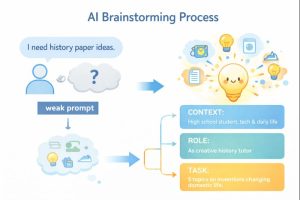
See the difference? The second prompt gives the AI a persona, a focus area, and a clear direction. It’s an invitation to a targeted brainstorming session.
Once you know how to frame great questions, let’s see that in action with practical examples.
Brainstorming in Action: Let’s Walk Through Examples
Let’s make this practical. Here are two common scenarios where AI can help you shake loose new ideas.
Example 1: The Blog Post or Essay Outline
You know you want to write about “sustainable gardening,” but you’re stuck on how to structure it.
Your Prompt: “I’m writing a beginner-friendly blog post about sustainable gardening for apartment dwellers. Act as an experienced editor. Brainstorm 7 different angles or structures for this post, from ‘how-to’ lists to personal storytelling approaches.”
How to Use the Output: The AI might suggest angles like “5 Sustainable Practices for Your Balcony,” or “A Month-by-Month Guide to Apartment Composting.” Don’t just pick one. Use the list to see which idea excites you the most, that’s your human spark deciding.
Example 2: Creative Project Ideas
You want to start a hobby podcast but have no clue about the theme.
Your Prompt: “I love true crime and cooking, but I want to start a unique, lighthearted podcast. Act as a witty podcast producer. Brainstorm 10 creative podcast concepts that somehow blend food and mystery in a fun, non-scary way.”
How to Use the Output: You might get ideas like “Recipe for a Heist,” exploring famous crimes and a dish from that location, or “Mystery Ingredient Challenge.” The AI’s wild combinations can help you land on a uniquely you concept.
Leveling Up: Advanced Techniques for Richer Ideas
Once you’re comfortable with basic prompting, try these techniques to deepen the brainstorm.
Ask for “Bad Ideas”: Seriously! Prompt: “First, give me 5 obviously bad or overdone ideas for a fantasy novel villain. Then, use those as inspiration to suggest 3 truly unique and compelling ones.” This forces the AI (and you!) to think outside the box.
The “Chain of Thought” Request: Ask the AI to think step-by-step. “Walk me through your reasoning for why [idea X] could be a strong solution to [problem Y].” This helps you understand the why behind a suggestion.
Combine and Refine: Take two interesting but separate ideas from the AI and ask it to fuse them. “Combine idea #3 (about a time-traveling chef) and idea #7 (about solving kitchen mysteries) into one cohesive podcast premise.”
Remember, you are always the director. Use these techniques to guide the AI deeper into your creative space.
How AI Can Improve Productivity
The Human in the Loop: Your Essential Role
This is the most important part. AI is a starting point, not a final destination. Every idea it generates needs your human touch.
Evaluate: Does this idea actually make sense for your audience, your skills, or your values?
Personalize: Add your own stories, opinions, and flavor. The AI gave you a structure; you fill it with soul.
Fact-Check: Always, always verify facts, dates, quotes, or data points provided by the AI. It can be confidently wrong.
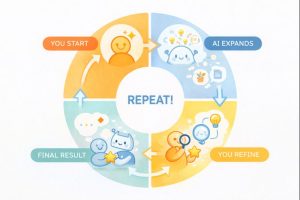
The best results come from this partnership. The AI throws a hundred colors on the canvas; you are the artist who decides which to blend and where they go.
Now that we’ve covered both the how and the why, let’s wrap it up with a summary of key takeaways.
Let’s Tackle Some Common Questions (FAQs)
Q: Is using AI for brainstorming cheating?
A: Not at all, any more than using a thesaurus or discussing ideas with a classmate is cheating. It’s a tool to enhance your own creativity, not replace it. The final product should always be uniquely yours.
Q: Do I need to be tech-savvy to do this?
A: Absolutely not! If you can send a text message or type a Google search, you have all the technical skills needed. It’s all about learning the conversation style.
Q: What if the AI gives me the same ideas as everyone else?
A: That usually means your prompt is too generic. Use the tips above—add more context, give it a role, ask for “bad ideas” first. The more specific you are, the more unique the output.
Q: Are these AI tools free to use?
A: Many popular AI chatbots have robust free versions that are perfect for beginners. You can start brainstorming today without spending a dime.
Q: How do I keep my ideas from being too random or disconnected?
A: Use the “refine” part of the process. After a big brainstorm, prompt the AI: “Now, take the three most promising ideas from your list and develop each into a simple paragraph with a core theme.”
Wrapping It All Up
Learning how to use AI for brainstorming ideas is like discovering a superpower for your creativity. It’s about breaking the cycle of staring at a blank screen and instead, starting a dynamic conversation that leads you to places you might not have found alone. Remember to start with a clear prompt, guide the AI with context, and, most crucially, stay in the driver’s seat to refine and personalize every suggestion.
The goal isn’t to get a perfect idea from the machine on the first try. It’s to create a flow where the AI’s endless combinations spark your best thinking. So the next time you feel stuck, don’t wrestle with the silence alone. Open up a chat, and start throwing some ideas around with your new digital buddy. You might just be surprised at what you can create together.
And if you’re curious about what comes after the brainstorm, let’s talk about how to organize and develop those brilliant ideas into a solid plan.

Leave feedback about this