


Beyond the Basics: How Advanced Prompt Engineering Can Transform Your Workday
If you’ve ever played around with an AI like ChatGPT, you’ve probably asked it simple questions or had it draft a quick email. That’s a great start! But what if you could have a true AI assistant for your specific job? One that doesn’t just give generic replies but understands the unique challenges of your profession?
That’s where advanced prompt engineering for specific professions comes in. It’s not about complex coding; it’s simply about learning to talk to AI in a way that makes it a more helpful and specialized partner for your work. Whether you’re a teacher planning lessons, a manager juggling projects, or a marketer crafting a campaign, a few smart tweaks to how you ask for help can make all the difference. Think of it as giving your AI a better job description.
To see how this works in the real world, let’s first break down what we’re really talking about when we say “prompt engineering”.
What is “Prompt Engineering” and Why Should You Care?
Before we dive into the advanced stuff, let’s clear up what a “prompt” even is. It’s just a fancy word for the instructions or questions you give to an AI. **Prompt engineering** is the skill of writing those instructions clearly and strategically to get the best possible results.
You might wonder, “Can’t I just ask normally?” You can, but often you’ll get a vague or generic answer. Think of it like this: If you ask a new intern, “Help with the project,” you might get a confused look. But if you say, “Please review this project timeline document and flag any tasks that don’t have a clear owner,” you’ll get exactly the help you need. Advanced prompt engineering applies this same logic of clarity and context to AI.
The good news is, you don’t need to be a tech whiz to do this well. You just need a simple, reliable formula to follow.
The Secret Sauce: The Three-Ingredient Formula
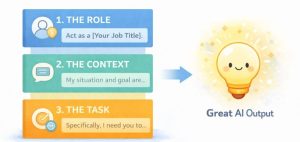
Forget memorizing complicated rules. Great prompts for any profession usually mix three simple ingredients:
1. The Role: Tell the AI who it should be. (“You are an experienced high school science teacher.”)
2. The Context: Explain the situation and your goal. (“I need to explain photosynthesis to 10th graders who find biology boring.”)
3. The Specific Task: Clearly state what you want it to do. (“Create a 5-minute interactive classroom activity that uses a superhero analogy.”)
Combining these turns a basic question into a powerful request. This simple formula is your key to unlocking more useful AI help, no matter what you do for a living.

Now that you have the basic formula in your toolkit, let’s put it to work. We’ll look at how this plays out in some very different jobs.
Prompt Engineering in Action: Templates for Real Jobs
Let’s move from theory to practice. Here’s how professionals in different fields can apply the three-ingredient formula. You can use these as templates and swap in your own details.
For the Educators: Planning Engaging Lessons
Teachers have one of the toughest and most important jobs. AI can be a fantastic co-pilot for planning, creating materials, and finding new ways to connect with students.
-
Weak Prompt: “Give me a lesson plan about the Civil War.”
-
Strong, Profession-Specific Prompt:
-
Role: “You are a creative history teacher skilled at project-based learning.”
-
Context: “My 8th-grade students have a hard time connecting historical dates to human stories. We’re starting a unit on the American Civil War.”
-
Task: “Generate three project ideas where students take on the perspective of a specific person (e.g., a soldier, a nurse, a freed person). For each, suggest a final output like a fictional diary entry or a short speech, and list two key historical facts they must include.”
-
Why it works: This prompt moves beyond a dry list of dates. It asks the AI to think like an educator, focusing on engagement, perspective, and curriculum requirements.
For the Project Managers: Taming Chaos
Project managers are masters of organization, communication, and anticipating problems. AI can help draft clear plans, spot risks, and keep everyone on the same page.
-
Weak Prompt: “Write a project update email.”
-
Strong, Profession-Specific Prompt:
-
Role: “You are a detail-oriented project manager for a software development team.”
-
Context: “We are two weeks into a 10-week website redesign project. The front-end development is on schedule, but the content delivery from the client is delayed by three days. I need to communicate this to our internal team and the client without causing panic.”
-
Task: “Draft two email versions: 1) A concise, internal update for our developer and designer highlighting the delay and asking for a proposed adjustment to the next sprint. 2) A diplomatic, solution-oriented email to the client, acknowledging the delay and suggesting a short catch-up meeting to get back on track.”
-
Why it works: It provides crucial background (the delay) and directs the AI to produce two distinct, tactful communications tailored to different audiences—a core PM skill.
For the Marketers & Content Creators: Sparking Fresh Ideas
Marketers need to constantly generate new ideas, understand audiences, and craft compelling messages. AI can be a boundless brainstorming partner that helps you break out of a creative rut.
-
Weak Prompt: “Write social media posts for a new coffee shop.”
-
Strong, Profession-Specific Prompt:
-
Role: “You are a brand strategist for a local, independently-owned coffee shop.”
-
Context: “Our shop is called ‘The Daily Grind.’ We want to emphasize community and quality, not just caffeine. Our target audience is remote workers and students aged 20-35. We are launching a new seasonal drink: a lavender honey latte.”
-
Task: “Brainstorm five unique content angles for Instagram to promote this drink. Avoid generic ‘come buy this’ posts. Instead, focus on storytelling, like connecting the drink to a ‘moment of calm’ or the local source of the honey. For each angle, suggest a visual style (e.g., close-up, cozy workspace shot).”
-
Why it works: It gives the AI a clear brand voice, target audience, and a specific creative constraint (“avoid generic posts”), which pushes it toward more original and strategic ideas.
These templates give you a strong foundation. Once you’re comfortable with them, you can use a few easy tricks to get even more precise and creative results.
Leveling Up: Pro-Tips for Even Better Results
Once you’re comfortable with the basic formula, try these easy upgrades to refine your AI’s output even further.
-
Ask for a “Brain Dump” First: Stuck? Tell the AI, “Let’s brainstorm. First, list 10 obvious or even bad ideas for [your topic]. Then, use those to inspire 3 truly innovative ones.” This helps bypass clichés.
-
Use the “Chain of Thought” Trick: For complex tasks, ask the AI to think step-by-step. Add: “Take me through your reasoning process.” This can lead to more logical and well-structured answers.
-
Iterate, Don’t Settle: Your first prompt is rarely your last. Treat it as a conversation. If the result isn’t quite right, follow up naturally: “That’s a good start. For the third project idea, can you make it more focused on economic causes?”
-
Provide Examples (When You Can): If you have a specific style in mind, show the AI. You can add: “The tone should be similar to this example email I wrote: [Paste a short sample].”
Remember, you are the expert in your field. The AI is a tool. Your professional judgment is what turns its output into something truly valuable.
The best way to get a feel for all this is to try it yourself. Let’s talk about how you can start experimenting safely and effectively.
Unlock Ideas with AI: A Beginner’s Brainstorming Guide
AI in Education: Learning Without Losing the Ability to Think
How AI Can Improve Productivity
Your Turn to Experiment
The best way to learn is by doing. Start with one of the templates above and adapt it to a real, small task you have this week. Don’t aim for perfection on the first try. The goal is to start a conversation with your AI helper and see how a more detailed request changes the quality of help you receive.
A quick, important note on best practices: The information here is for educational and professional assistance only. Always use your own expertise to review, edit, and take responsibility for any AI-generated content. AI is a fantastic aid for brainstorming and drafting, but the final decision and professional judgment must always be yours. Also, never share sensitive private company or client information in a public AI chatbot.
Before we wrap up, let’s address some common questions that often come up when people start using AI in their work.
Frequently Asked Questions
Q: Is using AI like this considered cheating at my job?
A: Not at all. Using a spreadsheet instead of paper isn’t cheating; it’s using a better tool. Think of AI the same way, it’s an assistant that handles drafts and brainstorming, freeing you up for the strategic thinking and final decisions that only you can do.
Q: Do I need to use special software for this?
A: No. You can start practicing advanced prompt engineering right inside free tools like ChatGPT, Google Gemini, or Microsoft Copilot. The skill is in how you communicate, not the tool itself.
Q: What if the AI gives me incorrect or “hallucinated” information?
A: This is a critical point. Always fact-check! AI can be confident but wrong. For any facts, data, quotes, or technical details, use it as a starting point and verify with trusted sources. You are the final quality control.
Q: Will these prompts work the same in every AI tool?
A: The core principles will, but the results may vary slightly. It’s a good idea to get familiar with one tool first. The skill of writing clear prompts is transferable between different AIs.
Q: How can I keep my company’s private data safe when using AI?
A: This is extremely important. Never paste sensitive company information, private data, client details, or unpublished strategies into a public AI chatbot. Check if your company has an approved, secure AI tool with proper data protection policies.
Wrapping Up: Your New Professional Superpower
Learning **advanced prompt engineering for specific professions** is less about tech wizardry and more about clear communication. By taking a few extra moments to set the scene, assign a role, and be specific, you transform AI from a casual chatbot into a tailored professional aid. It won’t do your job for you, but it can make you significantly more efficient, creative, and organized.
Start small, use the three-ingredient formula, and watch how a better prompt leads to better results. Your future self, enjoying a more helpful and productive workday, will thank you.