
Staying Safe Online Doesn’t Have to Be Complicated
Think about how many online accounts you use every day ranging from email, social media, school portals, shopping apps, or streaming services. Now imagine trying to log in one morning and realizing your password no longer works. Your inbox looks different, messages you didn’t send appear, and something feels off. For many beginners, this is how they first discover their account has been compromised.
The good news is that staying safe online does not require technical knowledge or expensive tools. Most account security problems happen because of simple mistakes, such as weak passwords or clicking unsafe links. With a few easy habits and a bit of awareness, anyone, including students and non-technical users can protect their accounts.
This guide explains online account security in plain language. You’ll learn practical steps, see real-life examples, and understand why each action matters without jargon or fear-based advice.
What Does “Securing an Account” Mean?
Securing an online account simply means taking steps to ensure that only you can access it. These steps reduce the chances of someone else logging in without your permission.
In most cases, account security involves:
- Creating strong passwords
- Adding extra login protection
- Being careful with emails and messages
- Keeping your devices secure
A helpful way to think about this is like locking your home. One lock offers protection, but adding more safety measures makes it much harder for intruders to get in.
Step 1: Use Strong and Unique Passwords
Why passwords matter
Your password is often the first line of defense for your account. If it is easy to guess, attackers do not need advanced skills to access your information.
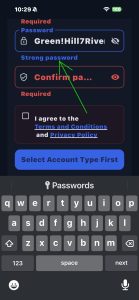
What makes a strong password?
A strong password should:
- Be at least 12 characters long
- Include letters, numbers, and symbols
- Avoid names, birthdays, or common words
Example:
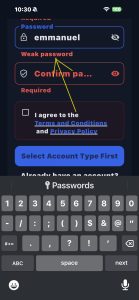
- Weak password:
emma123 - Strong password:
Green!Hill7River@Moon
Longer and more complex passwords are harder to guess, even by automated tools.

Use a different password for each account
Using the same password for multiple accounts is a common beginner mistake. If one account is compromised, attackers can try the same password elsewhere.
Example:
If your email and social media accounts share the same password, losing access to one could mean losing access to both.
Beginner-friendly tip
If remembering many passwords feels overwhelming, write them down and store them somewhere private and secure at home. Avoid saving them on shared or public devices.
Step 2: Turn On Two-Step Verification (2SV)
What is two-step verification?
Two-step verification adds an extra check when logging in. After entering your password, you must confirm your identity using something else, such as:
- A code sent to your phone
- A login approval notification
- An authentication app
Why this step is important
Even if someone learns your password, they still cannot access your account without the second verification step.
Example:
You log in to your email and receive a one-time code on your phone. Without that code, the login cannot continue.
Where to enable it
Most platforms offer two-step verification in the Security or Account Settings area. It is especially important for:
- Email accounts
- Social media accounts
- School or work portals
Step 3: Be Careful with Emails and Messages
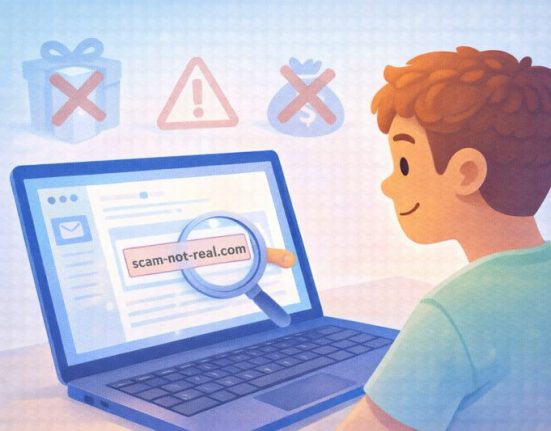
What is phishing?
Phishing happens when someone pretends to be a trusted company or person to trick you into sharing your login details.
Common warning signs
Be cautious of messages that:
- Create urgency, such as “Act now” or “Your account will be closed”
- Ask for passwords or verification codes
- Include suspicious links or attachments
- Contain spelling or grammar mistakes
Real-life example
You receive an email claiming to be from a popular service, asking you to verify your account through a link. The page looks real, but it is designed to steal your login details.
Safer habit:
Instead of clicking the link, open your browser and go directly to the official website.
Step 4: Keep Your Email Account Extra Secure
Why email security matters most
Your email account controls access to many of your other accounts. Password reset links, security alerts, and confirmations are usually sent there.
How to protect your email
- Use a strong, unique password
- Enable two-step verification
- Keep recovery details up to date
Simple example
If someone gains access to your email, they can reset passwords for your social media, shopping, and school accounts. Protecting your email helps protect everything else.
Step 5: Update Your Passwords Regularly
Why changing passwords helps
Over time, passwords may be exposed through data leaks or shared devices. Updating them reduces long-term risk.
How often should passwords be updated?
- Important accounts: every 6–12 months
- Immediately if you notice unusual activity
Tip for beginners
When updating a password, avoid making small changes like adding a number to the end. Create a new password instead.
Step 6: Secure the Devices You Use
Lock your devices
Always use a screen lock on your phone, tablet, or computer. This prevents unauthorized access if the device is lost or shared.
Log out on shared devices
When using public or shared computers:
- Log out after use
- Avoid saving passwords
- Use private browsing if available
Example
Logging into your email on a friend’s laptop and forgetting to log out could give them full access to your messages.
Step 7: Use Secure Internet Connections
Risks of public Wi-Fi
Public Wi-Fi networks are often less secure. Sensitive information entered on these networks may be exposed.
Safer alternatives
- Use mobile data for important logins
- Wait until you are on a trusted network
Simple rule
If you wouldn’t discuss something private in public, avoid entering it on public Wi-Fi.
Step 8: Check Account Activity Regularly
Why monitoring matters
Many platforms show recent login activity. Reviewing this helps you catch suspicious behavior early.
What to watch for
- Unknown locations
- Unrecognized devices
- Password changes you didn’t request
What to do if something looks wrong
- Change your password immediately
- Log out of all devices
- Review security settings
Step 9: Be Careful What You Share Online
Oversharing can increase risk
Publicly sharing personal details can make accounts easier to compromise.
Example
If your security question is “What is your favorite color?” and you post it publicly, attackers can guess the answer.
Safer approach
- Limit personal details on public profiles
- Use security question answers that are not obvious
Step 10: Use Official Apps and Websites Only
Why this matters
Fake apps and websites can look real but are designed to steal login details.
How to stay safe
- Download apps from official app stores
- Check website addresses carefully
- Avoid offers that seem too good to be true
Common Beginner Mistakes to Avoid
- Reusing the same password
- Ignoring security alerts
- Clicking unknown links
- Saving passwords on shared devices
Awareness plays a major role in online safety.
Practical Summary: Simple Steps You Can Start Today
Online account security is built on everyday habits, not technical expertise.
To stay safer online:
- Use strong, unique passwords
- Enable two-step verification
- Be cautious with messages and links
- Secure your email account first
- Lock your devices
- Avoid risky public networks
- Review account activity regularly
- Share less personal information publicly
- Start with your most important accounts today. Even small steps can make a meaningful difference over time.
FAQ Section
1. Why is online account security important?
Online account security helps protect your personal information from unauthorized access, misuse, and identity theft.
2. What is the easiest way to secure an account?
Using a strong, unique password and enabling two-step verification are the easiest and most effective steps.
3. Is two-step verification really necessary?
Yes. It adds an extra layer of protection even if your password is compromised.
4. Can public Wi-Fi put my accounts at risk?
Yes. Public Wi-Fi networks may be less secure, making it safer to avoid logging into important accounts on them.
5. How often should I change my passwords?
It’s a good practice to update important passwords every 6–12 months or immediately if you notice suspicious activity.